
DarkGlass Widgets
AppsLab Co.Personalization
4.637.00 Reviews
- Version
- 1.0
- Installs
- 10.00K
- Age Rating
- Everyone
Screenshots
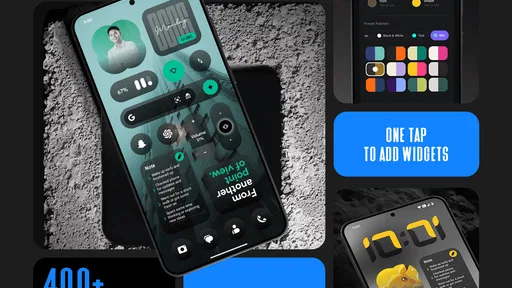
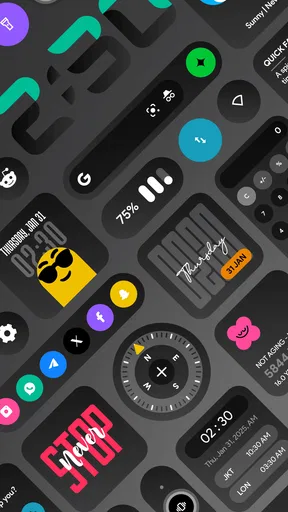
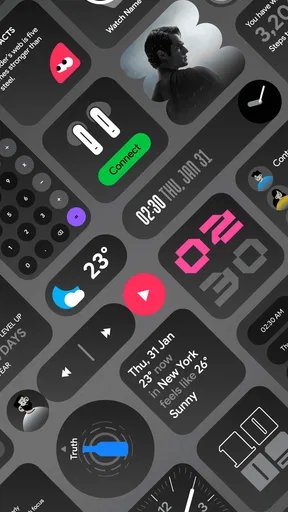
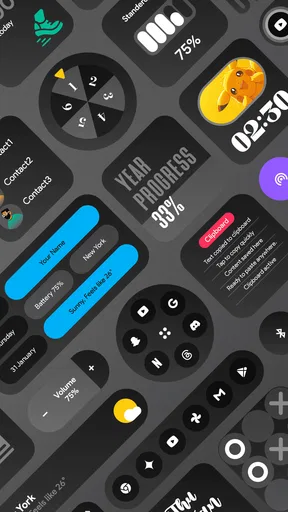
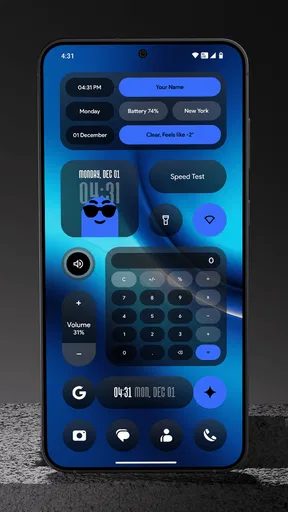
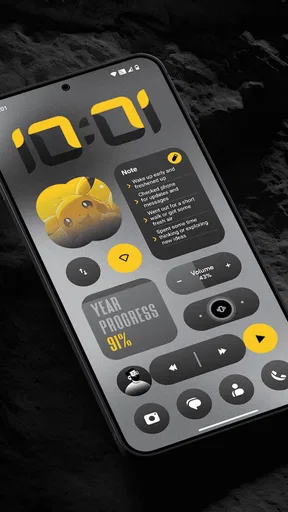
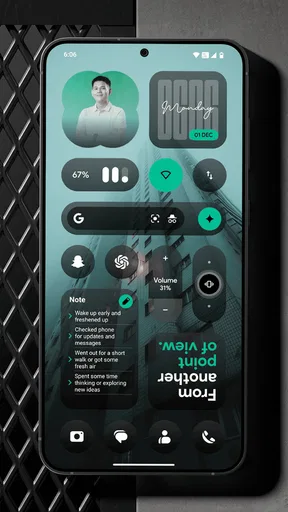
Our Review of DarkGlass Widgets
 Analysis by Appyee
I judge a home-screen personalization app less by how dramatic its screenshots look and more by whether its design still feels useful after the novelty wears off. DarkGlass Widgets puts a dark, glass-like visual style at the center of its appeal. I can see the point: a coordinated set of widgets can make a phone feel more considered without requiring a new wallpaper, launcher, or complete redesign. But a polished look only earns its place if the information on the screen remains easy to read and worth keeping there.
A dark-glass style with a practical purpose
The app is a personalization tool from AppsLab Co., built around a large collection of widget designs for home and lock screens. Its central idea is not simply “make everything dark.” It is to give useful screen elements a consistent, translucent-looking finish, so the clock, calendar, or other chosen information can feel like part of the overall layout rather than a pile of unrelated panels. For someone who already prefers darker interfaces, that visual consistency is the strongest reason to try it.
The collection is described as more than four hundred designs, which makes browsing and choosing part of the experience. That breadth can help if you enjoy adjusting your phone’s appearance to suit a particular wallpaper or mood. It can also make restraint important: picking a few widgets that serve a purpose is usually more effective than filling every available space just because there are many styles to explore.
I would treat the glass effect as a design choice, not a guarantee that every item will remain equally legible on every background. A busy wallpaper, bright highlights, or small text can compete with a translucent look. Before settling on a layout, I’d check the widgets against the actual wallpaper and screen brightness I use day to day. Readability matters more than matching every corner of the screen.
How I would build a screen around it
My practical approach would be to start with the one piece of information I reach for most often, then add only what saves another tap. A clock or calendar has a clear job; a second decorative panel may not. This keeps the visual treatment from becoming clutter and makes it easier to tell whether the chosen widget is genuinely helping or just taking up space.
For a more deliberate result, I’d choose the wallpaper first, then compare a small number of widget styles against it rather than trying to design everything at once. A dark-glass finish can look subtle on a simple background but disappear into a very dark one. If the screen feels too muted, changing the wallpaper may solve the problem more cleanly than adding more widgets or making every element larger.
The app costs $0.99, and it also offers in-app purchases priced from $1.99 to $9.49 per item. That means it is worth deciding whether the included selection already fits your needs before paying for extras. I would explore the available styles with a specific layout in mind instead of treating every additional design as automatically useful.
Using DarkGlass Widgets in everyday life
I’d use this section to focus on whether the dark-glass look remains practical once it becomes part of a normal routine, not just a fresh setup. A helpful test is to check the smallest details at the times and in the lighting where you usually glance at your phone, then keep only the panels that genuinely save you a step.
A useful home-screen habit
Widgets are at their best when they make a frequent glance quicker. If I want to check the time or orient myself around the day, keeping that information visible can reduce the small interruptions of opening separate apps. The value depends on the information being relevant to my routine; a screen full of items I rarely consult is still clutter, even when each panel looks good.
A realistic setup might be a calm wallpaper with one prominent time display and a second, smaller area for something I actually check during the day. I’d use that arrangement for a week before changing it. That trial makes it easier to distinguish a layout that looks appealing in the moment from one that continues to help when I’m rushing out the door or checking my phone between tasks.
What the visual approach does well—and where it can miss
Compared with choosing separate widgets wherever the phone already offers them, a collection built around one visual style has an obvious advantage: it can make the screen feel coordinated. Compared with a full launcher or theme overhaul, it is a narrower intervention. That can be a plus if I want to change the look of a few surfaces without rebuilding how I navigate the phone.
The trade-off is that a widget collection is not a replacement for a launcher, nor does a uniform appearance automatically make a screen more functional. People who want deep control over icons, gestures, folders, and app layouts may be better served by a launcher designed for those jobs. Someone who wants a single, plain information panel may also find the phone’s built-in options simpler. DarkGlass Widgets makes most sense when the visual style itself is part of the goal.
One useful decision rule is to separate “looks good” from “earns space.” I’d keep a widget only if I can name what I use it for without looking at the screen. If I cannot, it is probably decoration—and decoration is perfectly reasonable, but it should be a conscious choice. This small test helps prevent a home screen from becoming an attractive page that I immediately swipe past.
Things to consider before settling on a layout
The app is listed at version 1.0, so I would approach it as a focused release rather than assume it has a long history of refinements. That is not a reason to avoid it, but it is sensible to make a small change first and see how the widgets fit the way you use your device. The app has an average rating of 4.6 from over six hundred ratings, and more than ten thousand installs; those figures suggest interest, but personal fit still comes down to whether the style and available choices work for your screen.
It is rated for Everyone and requires at least version 12 of its operating system. The listed release date is December 7, 2025. I’d check that your device meets the requirement and that the purchase terms suit you before committing, especially if you are considering optional items as well as the initial app price.
Questions worth answering through your own setup
Will the dark-glass treatment stay readable on your wallpaper? The quickest way to judge is to try a simple background and then your usual one, looking at the smallest text in ordinary lighting. Do you need widgets on both the home and lock screens? The app’s focus covers both, but the most useful placement depends on what you actually check and what your device lets you place there. I would choose one surface first, then decide whether extending the look elsewhere adds convenience or merely repetition.
Another question is whether you want a curated visual identity or the freedom to mix unrelated styles. If consistency appeals to you, the collection’s common look is a reason to browse it. If you prefer every widget to have a different design, the same coherence may feel limiting rather than elegant. And if your priority is the most information possible at a glance, compare the space and legibility of a dark-glass panel with the simpler options already available on your phone before redesigning the whole screen.
Who is most likely to enjoy it
I’d recommend giving it a look if you enjoy dark interfaces, care about visual harmony, and are willing to spend a little time choosing a restrained layout. It can also suit someone who likes changing a phone’s appearance seasonally or after choosing a new wallpaper, as long as the widgets still serve a real purpose. The purchase price is modest, but the optional in-app items make it sensible to decide what you need before browsing extras.
I’d skip it if you strongly prefer bright, high-contrast designs, want extensive control over the entire operating-system interface, or rarely use widgets at all. It is also not the right fix for a screen that feels confusing because of too many apps or inconsistent habits; a new visual layer can make that screen prettier without making it simpler. In that case, removing unused items or reorganizing the existing layout is likely the better first step.
Have you ever found yourself scrolling through your phone, feeling like something's missing? Maybe your home screen could use a splash of style or a bit more functionality. Enter DarkGlass Widgets, the app that promises to transform your smartphone experience with minimal effort. I've been playing around with this app, and let me tell you, it's a game-changer.
What Are DarkGlass Widgets All About?
So, what exactly is DarkGlass Widgets? Well, imagine a set of sleek, modern widgets that not only look stunning but also offer utility. The app delivers a variety of widgets, from clocks to calendars, weather updates, and even task reminders, all wrapped up in a dark, glassy theme. It's like giving your phone a fashion makeover while keeping everything functional.
The Aesthetic Appeal
First off, let's talk visuals. If you're a fan of the dark mode trend, you're going to love this. The widgets have a sophisticated, glass-like appearance with a dark color palette that’s easy on the eyes. They blend seamlessly with any wallpaper, adding a touch of elegance without being too flashy. I was instantly hooked by how these widgets elevated the overall look of my home screen.
Customization Galore
One of my favorite things about DarkGlass Widgets is the level of customization it offers. You can tweak the size, shape, and even the opacity of the widgets. Want a larger clock right smack in the middle of your screen? No problem. Prefer a subtle weather update at the bottom? Easy peasy. The app gives you the freedom to design your home screen just the way you like it.
Function Meets Fashion
While the app is undeniably stylish, it doesn’t skimp on functionality. I found the weather widget particularly handy, providing real-time updates with a quick glance. The task reminder widget is another winner, helping me keep track of my to-dos without hopping between apps. It's all about simplifying your life while keeping things chic.
Getting Started
Setting up DarkGlass Widgets is a breeze. Once you download the app, you simply choose the widgets you want to add and customize them to your liking. The user interface is intuitive, so even if you’re not tech-savvy, you’ll find it easy to navigate. I was up and running in minutes, and honestly, it was kind of addictive tweaking the widgets to perfection.
Performance: Smooth Sailing
I've had my fair share of apps that look great but slow down my phone. Thankfully, this isn't one of them. The widgets run smoothly and don't hog resources, ensuring my phone stays fast and responsive. There's nothing worse than a laggy home screen, and I'm happy to report that's a non-issue here.
Compatibility and Availability
Whether you're an Android aficionado or an iOS enthusiast, DarkGlass Widgets has got you covered. The app is available for both platforms and works seamlessly across a wide range of devices. It’s always a relief to find an app that doesn’t play favorites with operating systems.
Final Thoughts
If you're looking to spruce up your phone without compromising on utility, DarkGlass Widgets is a solid choice. The combination of style and functionality is impressive, and the customization options mean you can truly make your phone your own. It's a small change that makes a big impact, and I’m all for it. So, go ahead and give it a spin—you might just find yourself wondering how you ever lived without it.
Verdict
Strengths of DarkGlass Widgets
- Intuitive user interface for easy customization.
- Wide variety of widget styles available.
- Efficient performance with minimal lag.
- Regular updates with new features.
- Seamless integration with most launchers.
Limitations of DarkGlass Widgets
- Limited free features; premium required.
- Occasional syncing issues with some devices.
- No direct support for tablet layouts.
- Ads can be intrusive in free version.
- Requires Android 8.0 or higher.
Other Releases by AppsLab Co.
View All
DepthX - Live Clock Wallpapers
Personalization4.1

NewThing Widgets Pro
Personalization4.5

Glass Widgets
Personalization4.5

Galaxy Widgets: One UI
Personalization4.4
Similar Picks in This Category
View All
Microsoft SwiftKey AI Keyboard
SwiftKey4.3

Wallpapers
Google LLC4.1

Zedge™ Wallpapers & Ringtones
Zedge4.7

Yandex Browser with Alice AI
Direct Cursus Computer Systems Trading LLC4.3

Ringtone Maker:create ringtone
Big Bang Inc.4.7

Fonts Keyboard
Fonts Keyboard3.9
Frequently Asked Questions
What is DarkGlass Widgets and how does it enhance my device?
DarkGlass Widgets is a customizable widget app designed to enhance your device’s home screen with sleek, modern designs. It offers a variety of widget styles that display essential information like weather updates, calendar events, and battery status. Its minimalist aesthetic complements dark mode themes, providing both functionality and style.
Is DarkGlass Widgets compatible with all Android and iOS devices?
DarkGlass Widgets is compatible with most modern Android and iOS devices. However, it’s important to ensure your operating system is updated to the latest version for optimal performance. Compatibility may vary depending on the specific model and system updates, so checking the app's requirements in the app store is recommended.
Does DarkGlass Widgets consume a lot of battery or storage space?
DarkGlass Widgets is designed to be efficient, minimizing both battery consumption and storage use. While running widgets continuously can slightly impact battery life, the app is optimized to ensure minimal drain. It also occupies a small footprint in terms of storage, making it suitable for devices with limited space.
Can I customize the appearance and functionality of the widgets?
Yes, DarkGlass Widgets offers extensive customization options. Users can adjust widget sizes, colors, fonts, and data displayed to match their personal style. The app also allows integration with other applications for seamless data updates, providing a personalized and convenient user experience.
Is there a cost associated with downloading or using DarkGlass Widgets?
DarkGlass Widgets offers a free version with basic features, while a premium version is available for purchase. The premium version includes additional customization options and exclusive widget designs. Users can choose to upgrade for a one-time fee or subscribe for ongoing updates and support.
